Mood Board Grid Photo Collage Templates: Your Visual Planning Toolkit
Crafting a compelling visual identity for a project often begins not with a final logo or a perfectly typeset headline, but with a feeling. It starts with a collection of textures, colors, images, and ideas that evoke a specific mood. This is the purpose of a mood board, and the Mood Board Grid Photo Collage Templates collection is designed to transform that abstract process into a structured, professional, and visually striking practice. These are not just empty frames; they are curated grid systems that act as a foundation for your creative vision, helping you organize inspiration and communicate a clear aesthetic direction to clients, collaborators, or your own team.
Anatomy of a Professional Mood Board Template
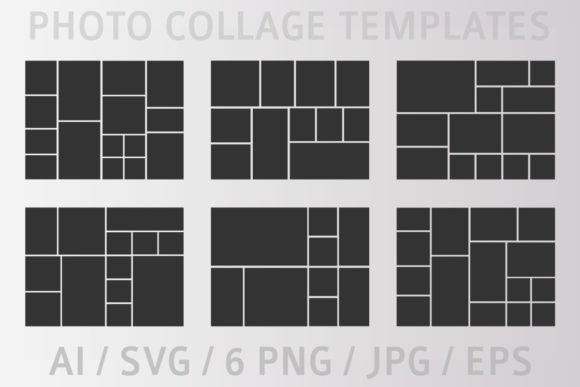
At first glance, a mood board grid is a series of rectangles. But a well-designed template, like those in this collection, is far more nuanced. The visual personality of these templates is one of clean, modern typography in layout form. They feature a balanced mix of large hero image slots, smaller detail shots, and negative space. This hierarchy is crucial. It allows you to guide the viewer's eye, emphasizing key imagery that defines the project's core concept while supporting it with secondary textures, color swatches, or keyword callouts.
The overall appeal lies in their structured flexibility. The grids are geometric yet organic, avoiding a rigid, spreadsheet-like feel. They are designed to feel curated, not cluttered. This style works exceptionally well for presenting brand concepts, as the structured grid mirrors the consistency required in a strong brand identity. Whether you are a designer presenting a logo design concept or a marketer outlining a campaign's visual direction, the templates provide a professional canvas that elevates your initial ideas. The collection's variety—from minimal, single-column layouts to complex, multi-image spreads—ensures you have the right tool for any project's scale.
Practical Applications Across Creative Fields
The true value of these design assets is revealed in their application. For a graphic designer or brand strategist, they are indispensable for the discovery phase. Instead of pasting images into a document, you can quickly assemble a cohesive presentation that communicates the intended font pairing direction, color palette, and photo style. This is especially powerful when discussing the interplay between a serif font and a sans serif font, or the vibe of a script font against industrial textures. The templates become a visual argument for a particular creative direction.
Beyond the design studio, their utility extends broadly:
- For Entrepreneurs & Small Business Owners: Use the templates to plan your product photography, packaging design, and social media aesthetic. A consistent visual language built with these grids can make your brand instantly recognizable on a crowded Instagram feed or a retail shelf.
- For Bloggers & Content Creators: Plan the visual theme for a blog series, a YouTube channel, or a newsletter. A mood board helps ensure your social media graphics and website imagery feel unified, strengthening audience connection.
- For Marketers & Publishers: Outline the visual tone for an entire campaign or a magazine feature. The grid format is excellent for presenting a range of imagery that will be used across digital and print mediums, ensuring visual consistency from an Instagram story to a printed brochure.
- For Crafters & Hobbyists: Planning a wedding, a home renovation, or a personal art project? These templates help you collect and organize inspiration from magazines, Pinterest, and photos into a single, beautiful reference sheet.
Working with Your Files: Customization and Integration
Receiving a ZIP folder with multiple file formats is a hallmark of a premium font or asset package, and this collection follows that professional standard. The inclusion of AI (Adobe Illustrator) and EPS vector files is significant. It means the grid lines, shapes, and any typographic elements are infinitely scalable without quality loss. You can resize a template for a large presentation board or a small social media thumbnail with perfect clarity.
The SVG file is particularly valuable for those working in web design or using modern design software like Figma or Canva. It allows for easy editing and integration into digital projects. The high-resolution PNG and JPG files offer a quick-start option; you can open them in basic photo editing software and start clipping images into the frames immediately.
Customization is straightforward. The vector files allow you to change the color of grid lines, backgrounds, or accent elements to match your project's palette. You can delete or rearrange grid sections, merge templates, or adjust the layout to suit your content. This transforms the templates from a static tool into a dynamic part of your creative workflow. When evaluating the fit for your project, consider the grid's personality. Does a minimalist, two-column grid suit your sleek, modern brand, or does a dense, magazine-style collage better capture the eclectic energy you're aiming for? Test it with your own imagery. The best template is the one that makes your collected inspiration look its most coherent and compelling.
Ultimately, these Mood Board Grid Photo Collage Templates are more than just a set of files. They are a framework for thinking visually. They encourage a disciplined yet creative approach to planning, helping you move from a vague idea to a concrete, communicable visual strategy. By providing a professional structure, they free you to focus on the creative content itself—the images, colors, and textures that will define your next project's success.